Appearance
Statistics
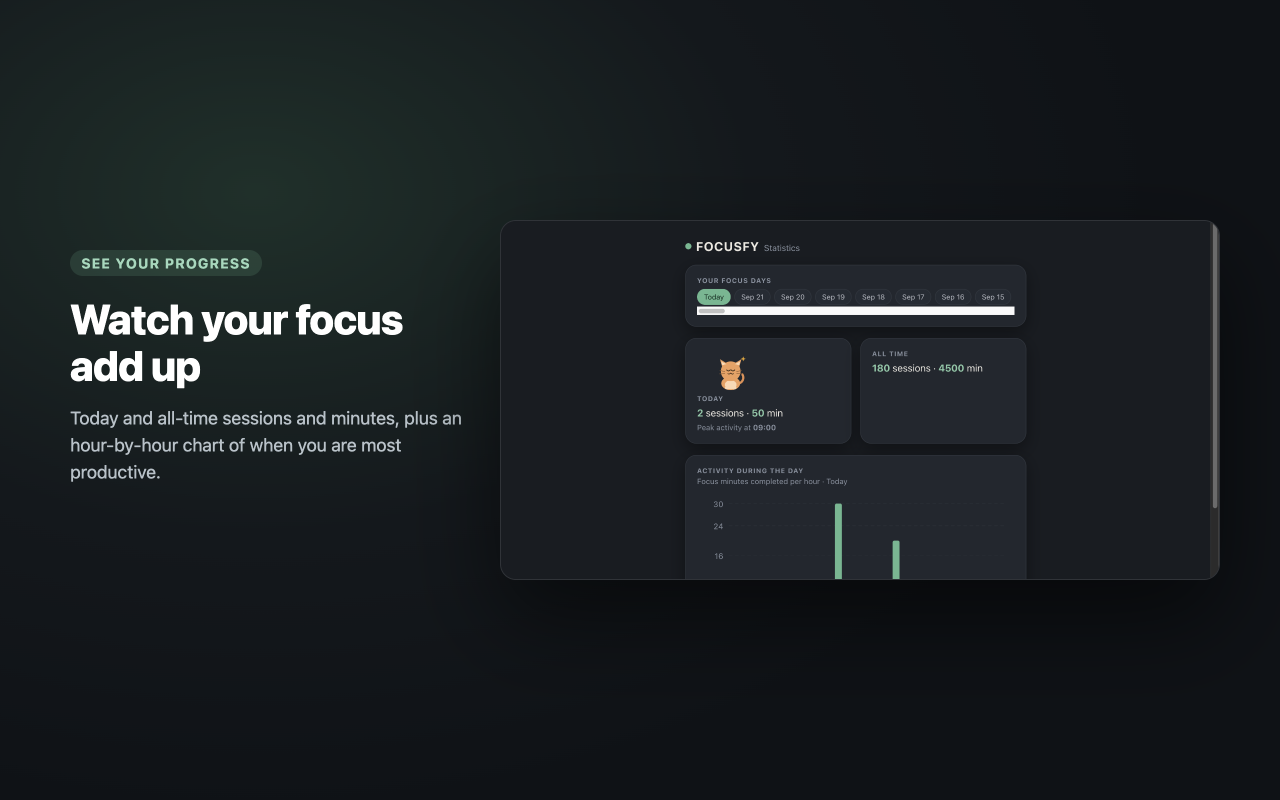
The statistics page shows how much focused work you have completed, day by day and all time.
Open the Statistics Page
You can reach it from:
- The popup — click Statistics in the footer.
- The session tab — click Statistics in the summary.
The page opens in a new tab (or brings the existing one to the front).
Browse the Days You Focused On
At the top of the page, Your focus days lists one button for every day you completed at least one focus session on, newest first. Today is always there — even before your first session of the day — and it is selected when the page opens. Click any day to see its numbers.
The Day You Are Viewing
The day card shows, for the selected day:
- The number of focus sessions completed.
- The total focus minutes.
- Peak activity — the hour of the day in which you completed the most focus minutes (shown only when that day has activity).
All-Time Progress
The All time card shows:
- The total number of focus sessions completed.
- The total number of focus minutes.
These totals always cover your whole history and do not change when you browse another day.
Activity During the Day
Below the cards you will find a bar chart of focus minutes completed per hour of the selected day:
- The horizontal axis shows the hours of the day (
0through23). - The vertical axis shows the focus minutes, with grid lines so you can read the scale at a glance.
- Each bar represents the focus minutes completed in that hour.
This makes it easy to see when you are most productive — for example, a tall bar in the morning versus the late afternoon.
AI Insights (optional)
On browsers that support Chrome's built-in AI, the page also shows an AI insights card. Click Generate insights and it writes a short, friendly read on your focus habits, based on the numbers already on this page (the day you are viewing, all time, and your busiest hour).
- It runs on your device using Chrome's built-in model — nothing is sent anywhere, and the extension still makes no network requests.
- It is optional: nothing is generated until you click the button.
- If your browser does not support the built-in AI, the card simply does not appear.
What Counts as a Session
- A session is recorded only when a focus session runs all the way to the end. Stopping a session early or starting a break manually does not count it.
- Breaks are not counted.
- Each completed session is stored under the day and hour it finished, which is what makes the per-hour chart accurate.
Your Data Stays Local
Statistics are stored in your browser using Chrome's extension storage. There is no account, no sync, and no data leaves your computer. History from older versions is read automatically — nothing you already have is lost.