Appearance
Export Format
This page describes exactly how Export trello structures the downloaded file. You can export to Excel (.xlsx) or CSV (.csv).
Choosing a Format
Before you download, the popup asks for a Format:
- Excel (.xlsx) — the default. A workbook with the lists-as-columns sheet, plus a Details sheet when you tick card details.
- CSV (.csv) — a single, plain comma-separated file with the lists-as-columns table. CSV has no second sheet, so card details are only available in the Excel format.
File Name
The downloaded file name is:
<board-title-first-20-chars>-trello.xlsx or <board-title-first-20-chars>-trello.csv
Example:
- Board title:
Product Roadmap Planning 2026 - Excel file name:
Product Roadmap Plann-trello.xlsx - CSV file name:
Product Roadmap Plann-trello.csv
Worksheet Name
For the Excel format, the generated worksheet name is:
Trello <board-title-first-20-chars>
Column Mapping
- Each Trello list title becomes a column header in the first row.
- Headers are exported in the same order they are read from the board page.
Card Mapping
- Every Trello card title becomes a row entry under its list's column.
- Each list starts at the top of its own column, so the first card of every list sits in the first data row.
- A list with no cards simply stays empty; the longest list decides how many rows the sheet has.
This means the columns are position-aligned: the first data row holds the first card of every list, the second data row the second card of every list, and so on.
Example
Given lists and cards:
To Do:Card A,Card BDoing: (no cards)Done:Card X,Card Y,Card Z
The exported sheet is equivalent to:
| To Do | Doing | Done |
|---|---|---|
| Card A | Card X | |
| Card B | Card Y | |
| Card Z |
Card Details (Details sheet, Excel only)
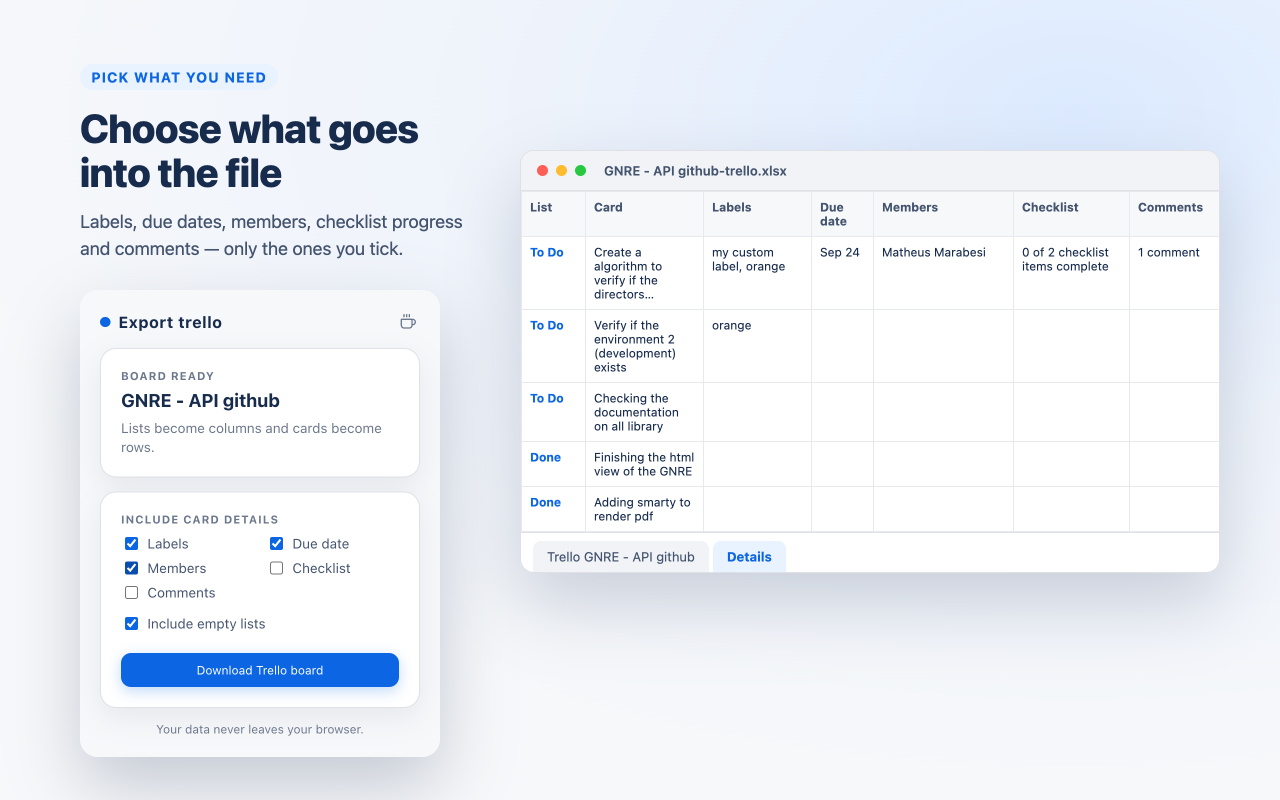
You choose which card details to include before exporting. When at least one is ticked, the Excel workbook gets a second worksheet named Details. It is a flat table — one row per card — so the lists-as-columns sheet above stays exactly the same. These checkboxes only appear for the Excel format; the CSV format contains the lists-as-columns table only.
The available columns:
- Labels — label names, or the label colour when it has no name.
- Due date — the due date shown on the card.
- Members — the members assigned to the card.
- Checklist — checklist progress, for example
0 of 2 checklist items complete. - Comments — the comment count, for example
1 comment.
Example Details sheet with every detail ticked:
| List | Card | Labels | Due date | Members | Checklist | Comments |
|---|---|---|---|---|---|---|
| To Do | Card A | bug, orange | Sep 24 | Ada (ada) | 0 of 2 checklist items complete | 1 comment |
| To Do | Card B | |||||
| Done | Card X |
The Include empty lists checkbox controls whether a list with no cards still appears as a column in the main sheet (it is on by default). For the Excel format at least one option must be ticked to export — otherwise the Download Trello board button stays disabled. A CSV always contains the main table, so it can be downloaded even with every option off.
CSV Files
The CSV format holds the same main table as the Excel sheet, as plain text:
- The first line is the header row with the list titles.
- Every following line holds one row position, with the cards of each list in their list's column — the same position-aligned layout as the spreadsheet.
- Values are quoted when they contain a comma, a quote or a line break (RFC 4180), lines end with
CR LF, and the file starts with a UTF-8 byte-order mark so Excel opens accented titles correctly.
Example:
csv
To Do,Doing,Done
Card A,,Card X
Card B,,Card Y
,,Card Z
The CSV has no second sheet, so card details (labels, due dates, members, checklist progress, comments) are only available in the Excel format.
Current Scope and Limits
- Export source: The currently open Trello board page.
- Domain support: trello.com only.
- Page requirement: Board URL with
/b/. - Formats: Excel (
.xlsx) or CSV (.csv). - Empty pages: If the page has no lists, or the board has no cards at all, no file is created — the popup explains that there is nothing to export.
- Data exported: List titles and card titles, plus (in the Excel format, optionally) labels, due dates, members, checklist progress and comment counts.
- Data not exported: Attachments, card descriptions, checklist items, comment text, or custom fields.
Why These Limitations?
This extension focuses on the core use case: exporting list and card structure for analysis and backup.